
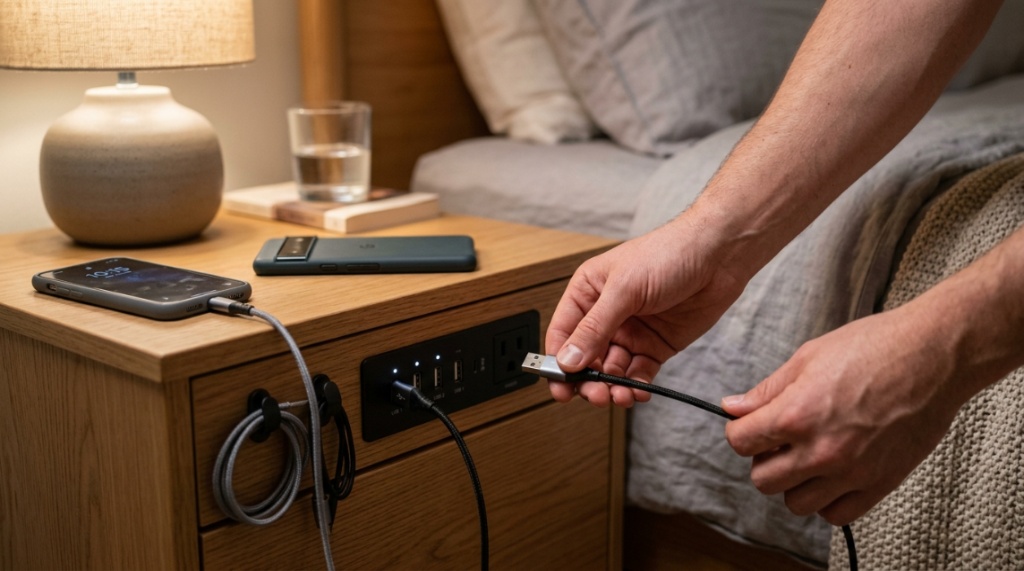

You’ve finally found the perfect spot for your Missouri bedroom, but there’s one nagging problem: a tangled mess of charging cables spilling off your nightstand, or worse, no place to charge your phone within arm’s reach. You need a piece of furniture that solves this modern dilemma—a nightstand that works as hard as you do. The solution lies in choosing nightstands in MO with charging stations, which blend storage, style, and integrated power so your devices stay juiced without cluttering your sleep space. This guide will walk you through the exact features to prioritize, the sizing considerations for your room, and the material choices that stand up to Missouri’s varied climate, ensuring you make an investment you won’t regret.
What Features Should You Look for in a Charging Nightstand?
When evaluating charging nightstands, focus on the type of ports, the placement of those ports, and the cord management system. The best models offer a mix of USB-A, USB-C, and standard AC outlets, ideally located on the back or side of the unit to keep the top surface clear. Also, look for a built-in cable management hole or a recessed channel to hide messy wires from view.
Understanding USB-A vs. USB-C Charging Ports
USB-C is the modern standard, delivering faster charging speeds (up to 65W in some premium models) for newer smartphones, tablets, and even laptops. USB-A ports are still common for older devices like e-readers or smartwatches. For future-proofing, ensure at least one USB-C port is present. The best nightstands in MO with charging stations provide both, so you are prepared for any device.
The Importance of AC Outlet Integration
Many buyers overlook AC outlets, but they are crucial for high-wattage items like a CPAP machine, a lamp, or a laptop charger. A single AC outlet built into the nightstand can eliminate the need for an extension cord, creating a safer sleep environment. Check if the unit has a surge protector built in—this is a non-negotiable safety feature for electronic devices.
Wire Management: The Hidden Key to a Clean Look
Look for a grommet hole or a notch on the back panel. This small detail allows you to thread the plug from the nightstand’s charging module to your wall outlet, keeping the cord out of sight. Without this feature, you’ll end up with a cord draping over the drawer or the front of the furniture, defeating the purpose of a neat bedroom.
Why Is the Height and Size of the Nightstand Critical?
Proportion is key. A nightstand that is too tall makes your bed look off-balance, while one that is too short makes reaching for your water bottle difficult. The ideal height is within two inches of the top of your mattress. Depth also matters—you want enough surface for a lamp and a book without the unit sticking out too far into your walking path.
Standard Height Guidelines for Missouri Bedrooms
Most mattresses sit 18–25 inches from the floor. Measure your bed frame and mattress combo before shopping. If you have a low platform bed, a shorter nightstand (20–24 inches) works best. For a pillow-top mattress, you might need a 26-inch tall unit. Always take your specific measurements to the store; don’t rely on generic “standard” sizing charts.
Single vs. Double Drawer: Storage Needs vs. Footprint
If you are in a compact St. Louis apartment, a single drawer with an open shelf below maximizes functionality without taking up too much floor space. For larger homes in Kansas City, a double-drawer unit offers more storage for bedside necessities like remotes, books, and sleep aids. Decide what you actually need to store near your bed, not what looks good in a showroom.
Measuring Your Space for the Perfect Fit
Use painter’s tape to outline the footprint of the nightstand on your floor before purchasing. Ensure there’s at least 24 inches of clearance between the bed and the wall if you have a walkway. If your room is narrow, consider a narrower nightstand (18–20 inches wide) to avoid crowding. Remember, the charging ports are useless if you have to crawl over furniture to reach them in the dark.
Which Materials Are Best for Missouri’s Climate?
Solid wood is ideal for longevity, but it can expand slightly with humidity, so consider engineered wood or metal frames for mixed climates. The best choice depends on whether you experience high humidity summers or dry winters. Materials like walnut and oak are durable, but metal frames with a powder-coated finish offer the most rust resistance.
Solid Wood vs. Engineered Wood: Durability Analysis
Solid wood (oak, walnut, acacia) is durable and can be sanded down if scratched, but it is susceptible to warping if exposed to constant moisture changes. Engineered wood (MDF or plywood with veneers) is more dimensionally stable and resists moisture better, making it a safer bet for basements or rooms without air conditioning. For the price, quality MDF with a real wood veneer often performs better in a suburban Missouri home.
Metal and Acrylic Options for a Modern Look
Metal frames with an open lower shelf are trendy and easy to dust. They do not warp, but they can feel cold and may conduct electricity if not properly insulated. Acrylic is a compromise—it looks modern and is easy to clean but is prone to scratches. If you prioritize zero maintenance, a matte black metal frame with a solid wood top is the safest option.
Understanding Finishes and Scratch Resistance
Look for a lacquer or polyurethane finish, which seals the wood and protects against scratches and water rings. Matte finishes hide fingerprints better than glossy ones, which is important for a surface you touch daily. Avoid raw, unsealed wood, as sunscreen and lotion can permanently stain the surface. Check the product spec for “water-resistant” labels.
How Do You Safely Power Your Electronics on a Nightstand?
Always check for UL or ETL certification on the electrical components. This certification ensures the charging station meets US safety standards, protecting you against short circuits and overheating. Also, verify the total wattage rating—do not plug in a space heater or a high-draw appliance, as most built-in units are only designed for 1–2 amps per USB port and 15 amps total for the AC outlet.
Voltage and Surge Protection: What You Need to Know
Look for a built-in surge protector with a joule rating of at least 300–500. This will handle sudden power spikes during Missouri thunderstorms. A basic nightstand without surge protection will simply pass through that spike, potentially damaging your phone. The small price difference between a simple charging module and one with surge protection is well worth the insurance on your devices.
Thermal Management: Preventing Overheating
Quality nightstands will have the charging ports and converters housed in a metal cavity to dissipate heat. Avoid units where the ports are stacked too closely in a sealed wooden box; this can trap heat and shorten the lifespan of the charger. Always leave a small gap between your phone and the wood surface to allow airflow while it’s charging.
Cable Length and Placement of the Power Cord
Most nightstands come with a 6-foot power cord. Measure the distance from the nightstand to your wall outlet. If your outlet is behind the bed, you may need to run the cord underneath the bed, which is a trip hazard. In this case, look for a nightstand with a low-profile cord channel that allows you to route the cord along the base of the furniture, not across the floor.
Can You Find Affordable Charging Nightstands in Missouri?
Yes, prices range from $150 to $600 for quality units. The key is to balance cost against the type of charging technology and material durability. A $200 MDF nightstand with basic USB ports may last 5 years, while a $400 solid wood unit with wireless charging can last decades. You can also find affordable options through local furniture outlets in St. Louis or online retailers that ship to Missouri.
Budget-Friendly Picks: Under $300
In this range, expect to find engineered wood with a laminate finish and 2–3 basic USB ports. This is adequate for charging a phone and a smartwatch. Look for brands like Sauder or Prepac, which offer functional designs. To source the best deals, consider checking this curated selection of nightstands in MO with charging stations to compare popular models available locally.
Mid-Range Options: $300 to $500
This price bracket typically includes solid wood tops, dovetail drawers, and more powerful charging modules (USB-C PD 30W+). You will also find better finishes and more sophisticated cable management. This is the sweet spot for most homeowners because you get genuine quality without the luxury markup.
High-End Features Worth the Investment
Above $500, you get features like integrated Qi wireless charging pads (just set your phone down), inductive charging zones, and even Bluetooth speakers. You are also paying for artisan craftsmanship or designer names. Only invest in this tier if you value the aesthetic and plan to keep the nightstand for 15+ years. Otherwise, the mid-range is functionally superior.
When Should You Choose a Wireless Charging Nightstand?

Choose wireless if you have a new phone (iPhone 12 or later, or Samsung Galaxy S10 or later) and you hate dealing with cables. However, wireless charging is often slower and generates more heat. If your phone does not have built-in Qi compatibility, you will need to buy a specific case, which adds cost. It is best for convenience, not speed.
Pros and Cons of Qi Wireless Pads
Pros: No cable to plug in, works with multiple devices if you have a multi-device pad, and keeps the nightstand surface clean. Cons: Your phone must be placed precisely, you cannot pick up your phone and use it while it’s charging (without breaking the connection), and charging speed is capped at 7.5W–15W for most iPhones and Androids, which is slower than a 20W wired USB-C connection.
The Speed Factor: Wired vs. Wireless
Wired charging is significantly faster and more efficient. A 20W wired charger can refill your phone to 50% in 30 minutes; a wireless pad may take an hour. For most people, plugging in a cable takes 2 seconds, so the speed loss is often not worth the convenience of wireless. Choose wired if your lifestyle is fast-paced.
Compatibility Issues with Phone Cases
Even a 1.5mm thick case can reduce charging efficiency or stop it altogether. If you use a MagSafe case or a wallet case, you may need to remove it every night, which is annoying. Before buying a wireless nightstand, verify that your specific phone case is Qi-certified. Many “tough” cases with magnetic mounts will not charge unless the pad is positioned perfectly.
How to Set Up and Maintain Your Charging Nightstand?
Setup is straightforward: place the nightstand near an outlet, plug the adapter in, and thread the cable through the management hole. Maintenance is minimal—dust the ports with a dry brush monthly to prevent lint buildup, and check the cords for any fraying. Do not use wet wipes on the electrical components.
Step-by-Step Unboxing and Installation
First, remove all packing materials carefully—do not cut too deep with a box cutter as you may damage the power cord. Second, assemble the base or legs, then attach the top with the pre-installed charging module. Third, plug in the power adapter to the wall, not the nightstand yet, to test the ports with your device. Finally, place the unit in your room and hide the cord.
Cleaning and Care for Electrical Components
Disconnect the nightstand from the wall before cleaning. Wipe the wood or metal surface with a slightly damp, soft cloth. For the charging ports, use a can of compressed air to blow out dust and pocket lint. Never spray cleaner directly into the ports. Check monthly for loose connections or signs of discoloration on plugs, which could indicate overheating.
Troubleshooting Common Charging Issues
If your phone isn’t charging, first check if the adapter is hot—if yes, the unit may be overloaded. Unplug everything and plug just one device. If still no charge, try a different cable to ensure the cable isn’t the problem. Most nightstand charging units have a small LED light indicator; if it’s off, the unit is not receiving power. Check your circuit breaker if no lights appear, Keep your tech gear clean and dust-free without risking hardware malfunctions. Check out our guide on how to choose a handheld vacuum for electronics without causing static damage to safely maintain your charging stations and bedside gadgets.
What Are the Best Placement Strategies for a Charging Nightstand?
Place the nightstand on the side of the bed where you actually sleep. If you sleep alone, put it on your dominant side so you can reach it without twisting. If you have a partner, consider placing a smaller charging bench or a shelf on the wall for the other person, rather than buying two large nightstands that crowd the room.
Bedside Alignment: Left Side vs. Right Side
If you’re right-handed, place the charging nightstand on the right side of the bed facing the bed. This allows easy reach for your phone and water bottle. Ensure the side is free of furniture obstructions so the top drawer can open fully. Plan accordingly when choosing which side to place the unit.
Dealing with Limited Wall Outlet Access
If no wall outlet is near the bed, consider hiring a licensed electrician to install a recessed outlet behind the nightstand. This is a small project (under $200) but eliminates all cord clutter. Or, choose a nightstand with a battery-powered charging module, though these are less common and require periodic recharging of the internal battery.
Styling Tips for a Seamless Look
Avoid placing a large lamp next to the charging pucks—it will block them. Use a wall-mounted sconce for lighting instead. Keep the charging area clear of books and glasses. Place a small tray on the side for your keys and wallet. Do not stack papers on the charging mat—this prevents heat dissipation and can cause a fire hazard.
Which Brands Offer the Most Reliable Charging Nightstands in Missouri?
Reliable brands include Concepts in Wood, Martin Furniture, and Tribesigns, which are widely available in US markets. These brands have a track record of using certified electrical components and solid wood construction. Also, look for brands that offer a 1-year warranty on the electronics, which is a sign of confidence in their product.
Top-Rated National Brands That Ship to MO
For online purchases, consider brands like Walker Edison and Saigon that offer mid-century modern styling and quality charging panels. These are often sold through Amazon or Wayfair and ship directly to your doorstep in Missouri. Always read recent reviews to ensure the electrical issue has not been a common complaint.
Local Furniture Stores & Custom Makers in MO
Check local stores like St. Louis Design Center or Nest Furniture in Kansas City for unique pieces. Local custom makers can incorporate a high-wattage charging block into a custom-built nightstand, ensuring it perfectly matches your bedroom dimensions. This is a great option if you have an oddly shaped room or a specific aesthetic.
Red Flags to Avoid When Buying Online
Avoid any listing that does not clearly display the “UL Listed” logo on the power adapter. Also, steer clear of deals under $100 with 4K reviews—these are often knockoffs with poor insulation. Check the product dimensions carefully; many online renders make the nightstand look larger than it is. Trust but verify specifications.
Frequently Asked Questions
Are charging nightstands safe to use while sleeping?
Yes, they are safe if certified (UL or ETL). Always read the manual to ensure you are not exceeding the wattage limit. Avoid placing them under fluffy comforters that can trap heat. As long as there is airflow and you use quality cables, it is safe to have them running overnight.
Can I use a wireless charging nightstand with a thick phone case?
Generally, no. Charging efficiency drops significantly if the case is thicker than 3mm. You may need to remove the case or purchase a slim, Qi-compatible case. Test it at the store or buy from a retailer with a generous return policy to test it in your home.
How long do the charging ports last?
With normal use, the ports should last 3–5 years. The wear is primarily on the cable and the physical port from plugging and unplugging. If the port becomes loose, it is usually a replaceable part, but it is often easier to use a high-quality cable with a right-angle connector to reduce stress on the port.
Will a charging nightstand increase my electricity bill?
Negligibly. The standby power (when no device is charging) is less than 0.5 watts. Charging a phone consumes about 5-10 watts for a few hours. At Missouri’s average electricity rate of $0.13/kWh, it will cost you less than 50 cents per month to charge your phone every night.
What is the standard depth for a charging nightstand?
The standard depth is between 16 and 20 inches. This allows for a charging module and drawer to fit while keeping the front of the nightstand aligned with the edge of the bed. Anything deeper than 20 inches may stick out too far into the room, especially in tighter spaces.
Can I get a custom nightstand with specific charging requirements?
Yes, local cabinet shops in Missouri can build a custom unit with a specific number of ports and a specific wattage. This is more expensive (starting at $500 for labor and materials), but it guarantees the perfect fit and function for your unique device collection.
Do charging nightstands come with a warranty?
Most major brands offer a 1-year limited warranty on the electrical components. Some premium brands offer a 5-year warranty. Always register your product after purchase to activate the warranty. Keep the receipt and a record of the date of purchase for any future claims.
Conclusion
Choosing the right nightstands in MO with charging stations is about more than just picking a spot to put your phone—it’s about enhancing your daily comfort and the safety of your electronics. Remember to prioritize UL certification, choose USB-C for future speeds, and match the height and material to your specific room conditions, whether you face humid summers or cold winters. By focusing on wire management and proper wattage, you will keep your bedroom organized and your devices ready for the day. Do not settle for a mismatched, cord-cluttered space. Take the time to measure your room, decide for wired or wireless, and invest in quality furniture that serves you effortlessly. Start browsing your local options today and transform your bedside into a clutter-free, fully powered haven.